Home Page (Dev Home)
The Home page of Dev Home provides quick access to the tasks that are routinely performed on a development console.
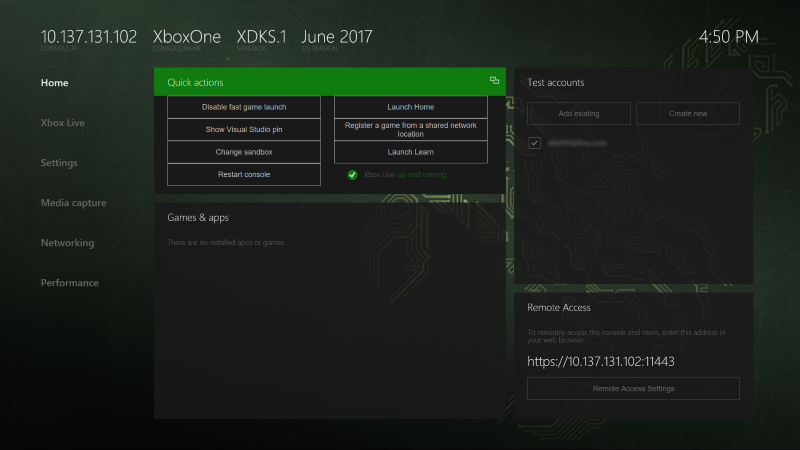
The Home page contains the following panes:
Quick actions
The Quick actions pane contains the following buttons that provide quick access to frequently-performed actions:
- Disable/Enable fast game launch: Enabling fast game launch leaves the Title OS running when launching a game, signficantly reducing startup time. See Speeding up Deployment and Iteration Times for more information.
- Show Visual Studio pin: Displays a code that you can use to pair the development console with the Visual Studio installation on your computer.
- Change sandbox: Allows you to change which sandbox the console is in.
- Restart console: Restarts the development console.
- Launch Home: Launches the retail Home screen.
- Register a game from a shared network location: Registers a game from a shared network location.
- Launch Learn: Opens the Developer Education app, where you can watch videos about Xbox development.
You can also see the status of Xbox Live in this pane.
Games & apps
The Games & apps pane can be used to perform the following actions:
- View the list of games and apps installed on the development console.
- Quickly launch games and apps.
- View the PLM (Process Lifetime Management) state of games and apps. For more information on PLM, see Process Lifetime Management (PLM) for Xbox One.
- Change PLM states from a context menu.
- Register and run a title from a remote network share. For more information, see Run from PC Deployment.
- Configure an Overlay Folder for a game. For more information, see Managing Overlay Folders (Dev Home).
Test accounts
The Test accounts pane can be used to perform the following actions:
- View the list of users registered on the console.
- Sign a user in or out with a single click.
- Add users and guest accounts. See Creating a new test account in Dev Home or Xbox Device Portal for more information on creating new accounts.
- View details of users and guest accounts.
Remote Access
The Remote Access pane displays the IP address and port that you can use to manage your console from a web browser. For more information, see Xbox Device Portal (Windows Device Portal on Xbox).
See also
Developer Home on the Console (Dev Home)
Debugging with Overlay Folders
By viewing details of a game in the Games and Apps section of Dev Home you can view and manage the Overlay Folder configured for the game.